

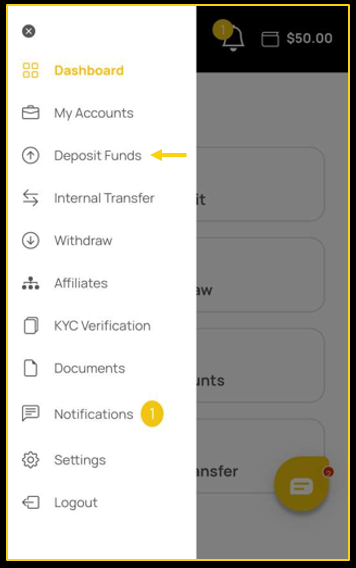
 To deposit Ripple (XRP) to your account, follow the below steps.
- You will need to go to the Deposit Funds section.
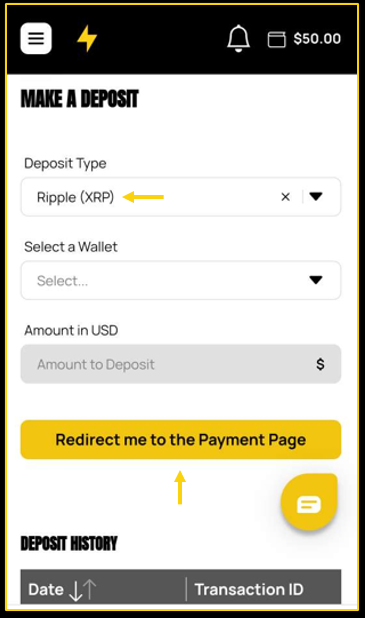
- Choose Ripple (XRP)in the Deposit Type section.
- Choose which wallet you would like to fund.
- Enter the amount.
- Tap on the Redirect me to the Payment Page button.
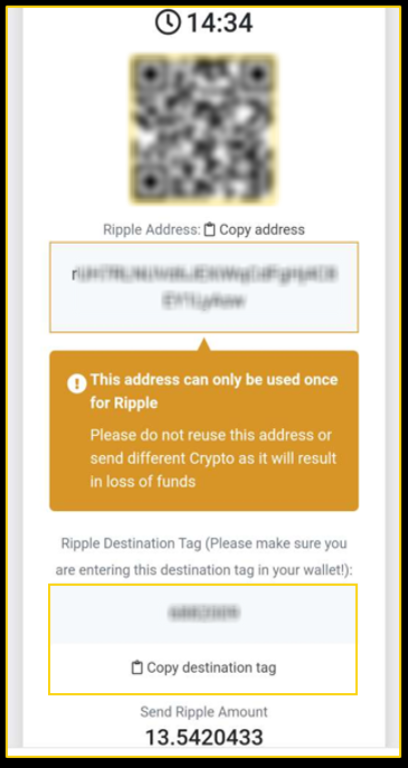
- Now, you will need to open up your wallet provider’s account.
- You may either scan the QR code or copy the address onto their account.
- You will need to provide the tag destination.
 If the status of your deposit on your account changes to Waiting Confirmation, this indicates that the funds have been sent and will be received in your account within 1-3 hours.
You can monitor the transaction by pasting the Ripple (XRP) address to https://blockchair.com/.
At the moment, if you deposit via Ripple (XRP), you would need to withdraw via any of the cryptocurrencies available on the Withdrawal tab.
